SEO for US Businesses in 2026: What Actually Matters
September 24, 2026Read Post
f Google Search Console shows "Discovered - not indexed" or "Crawled - not indexed" next to your pages, this guide explains exactly what each status means and why it happens. Learn the real causes from low domain authority and weak internal linking to thin content and sitemap errors plus the step-by-step fixes that actually get pages indexed.
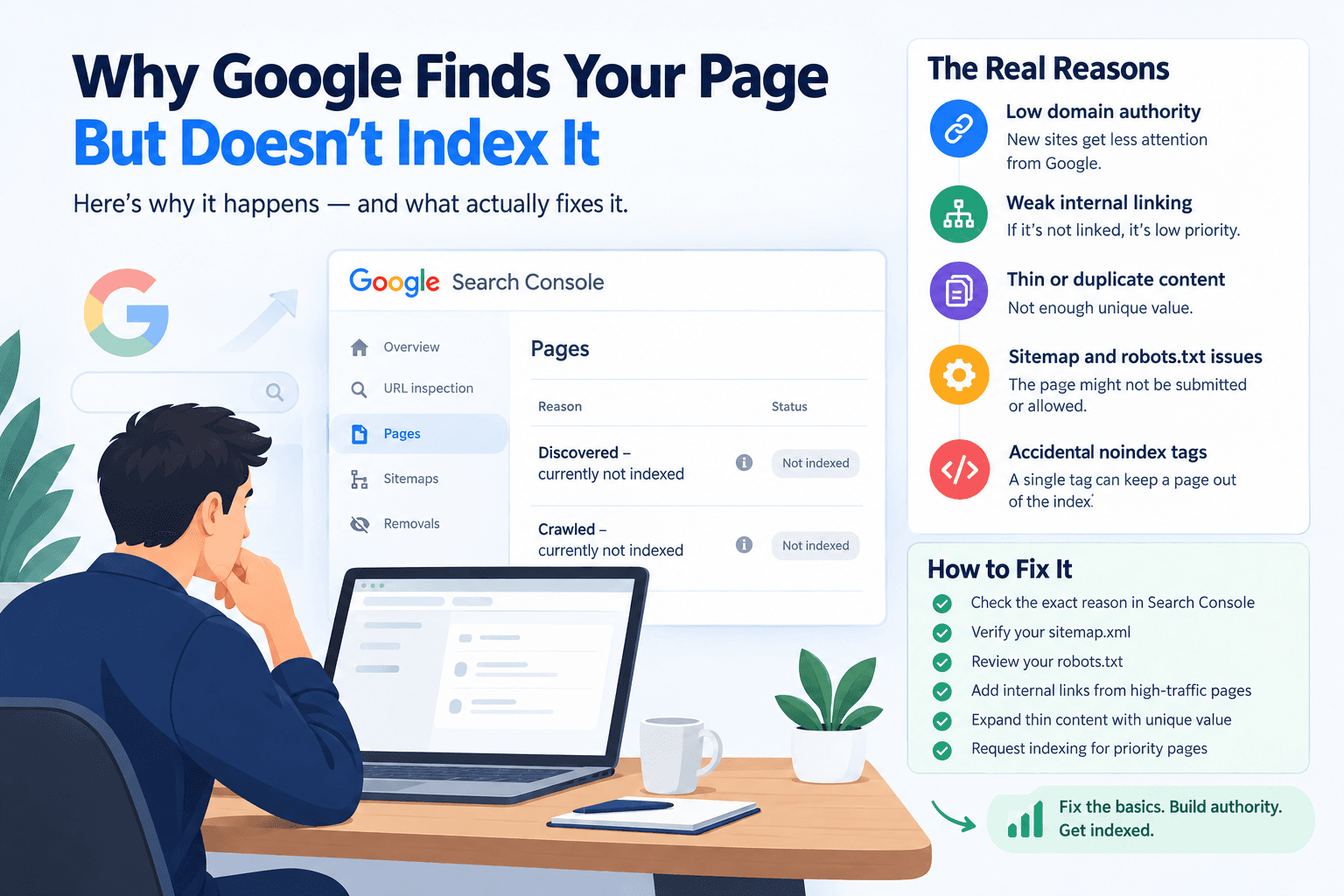
You published a page, submitted your sitemap, and waited. Weeks later, you check Google Search Console and see it "Discovered, currently not indexed" or "Crawled, currently not indexed." The page exists. Google even knows it exists. It's just choosing not to show it in search results. Here's why that happens, and what actually fixes it.
This is the part most business owners get wrong: having a page live on your site doesn't guarantee Google will index it. Indexing is a decision Google makes, not an automatic step after crawling. Every page competes for a limited amount of attention Google is willing to give your domain, and new or low-authority sites get far less of that attention than established ones.
"Discovered - currently not indexed" Google knows the page exists usually from your sitemap or an internal link but hasn't crawled it yet. This almost always comes down to crawl budget: Google is prioritizing other pages on your site (or other sites entirely) over this one. It's not a rejection. It's a queue.
"Crawled - currently not indexed" This is more concerning. Google visited the page and decided not to index it. This usually points to a quality or duplication issue thin content, a page too similar to another one on your site, or content Google's algorithms judged not valuable enough to serve searchers.
Knowing which status you're dealing with changes the fix entirely, so always check the exact reason in Search Console before assuming you know the cause.
1. Low domain authority New sites, or sites without many quality backlinks, simply get crawled less often and less thoroughly. This is the root cause behind most "Discovered - not indexed" situations, and there's no shortcut around it authority is built over time through backlinks and consistent content.
2. Weak internal linking If a page isn't linked from your homepage, navigation, or other important pages, Google treats it as low priority. A case study or blog post buried three clicks deep with zero internal links pointing to it sends a clear signal: this page doesn't matter much.
3. Thin or duplicate content Pages with very little unique text think team bio pages with just a name and photo, or near-identical service pages often get crawled and then deliberately excluded because they don't offer enough distinct value to justify a spot in the index.
4. Sitemap and robots.txt issues Sometimes the fix is embarrassingly simple: the page isn't actually in your sitemap.xml, or a robots.txt rule is accidentally blocking an entire folder like /blog/ or /case-studies/. Always verify both before assuming a deeper problem.
5. Accidental noindex tags A leftover "noindex" meta tag from development or a CMS default setting will keep a page out of the index no matter how good the content is. This is worth ruling out early since it's a two-minute check.
Start with Search Console's "Pages" report and read the exact reason listed for each URL don't guess. From there:
Confirm the page is included in your sitemap.xml and resubmit it in Search Console if needed
Check robots.txt hasn't accidentally blocked the relevant path
Add meaningful internal links from high-traffic pages to the ones not getting indexed
Expand thin pages with genuinely useful, unique content
Use the URL Inspection tool to manually request indexing for your highest-priority pages once the underlying issue is fixed
For "Discovered - not indexed" pages specifically, manual submission alone often isn't enough if the real issue is low site authority Google will keep deprioritizing your pages until your domain earns more trust through backlinks and consistent, quality content.
Indexing problems are rarely about one broken setting. They're usually a mix of technical hygiene (sitemap, robots.txt, noindex tags) and a bigger, slower-moving factor: how much authority Google has decided your domain has earned. Fix the technical issues first they're quick wins then treat authority-building as the ongoing work that actually determines how fast future pages get indexed.
If you're seeing multiple pages stuck in "not indexed" status and can't pin down why, a full technical audit will usually catch what a quick manual check misses.
Get a comprehensive SEO & AI visibility audit for your website with zero obligation.