SEO for US Businesses in 2026: What Actually Matters
September 24, 2026Read Post
Great content on a technically broken website rarely ranks well. Before any keyword research or content plan matters, Google needs to be able to crawl your site efficiently, load it quickly, and understand what it's looking at. This guide covers the technical SEO fundamentals that actually move the needle for small business websites without the jargon.
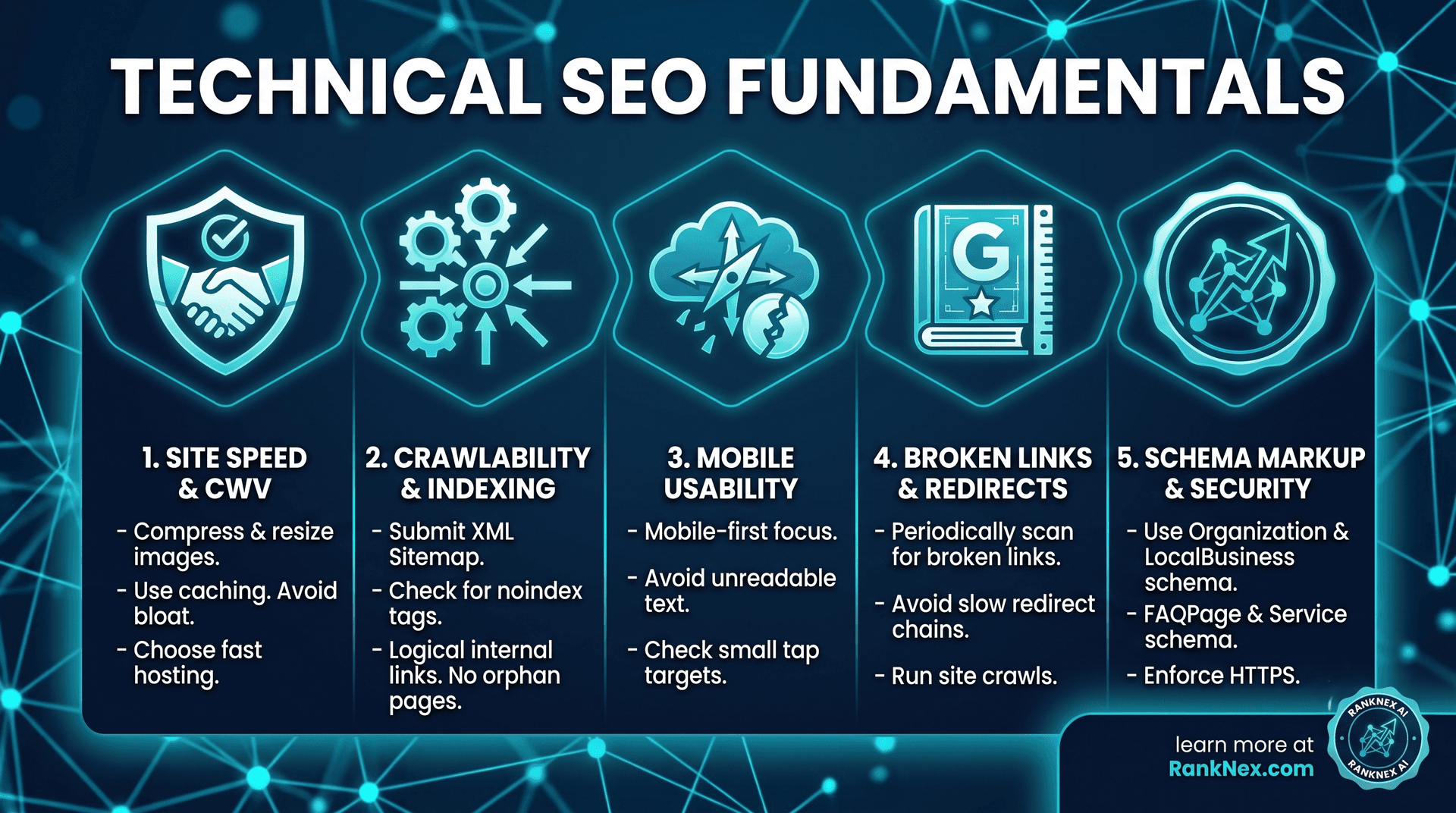
Google measures how fast your pages load and how stable they feel to use, grouped under "Core Web Vitals." Slow, janky pages hurt both rankings and conversion rates visitors abandon slow sites before they even see your offer.
Practical fixes that make the biggest difference:
Compress and resize images before uploading (most sites serve images far larger than needed)
Use a caching plugin or built-in caching if you're on WordPress
Avoid loading unnecessary scripts and plugins that aren't actively used
Choose hosting that's actually fast, not just cheap
If Google's crawler can't find or access a page, it won't rank no matter how good the content is. Check for:
A clean XML sitemap submitted through Google Search Console
No accidental noindex tags on pages you want to rank
A logical internal linking structure, so every important page is reachable within a few clicks from your homepage
No orphan pages (pages with zero internal links pointing to them)
Google indexes and ranks based primarily on the mobile version of your site. If your mobile experience is cramped, has unreadable text, or hides important content, that directly affects your rankings not just your mobile conversion rate.
Test your key pages on an actual phone, not just a browser window resized smaller. Look for tap targets that are too small, text that requires zooming, and layout shifts as the page loads.
Broken internal or external links hurt user experience and waste crawl budget. Redirect chains (a URL that redirects to another redirect, which redirects again) slow down both users and crawlers. Run a site crawl periodically with a tool like Screaming Frog or Google Search Console's coverage report, and fix what you find every broken link is a small trust signal lost, both with visitors and with search engines.
Schema markup is structured data added to your site's code that explicitly tells search engines what something is a business, a product, a review, an FAQ. It doesn't guarantee better rankings on its own, but it makes your listing more likely to show enhanced results (star ratings, FAQ dropdowns, business details) directly in the search results, which improves click-through rate.
Common schema types worth adding for a small business site:
Organization schema (name, logo, contact details, social profiles)
LocalBusiness schema if you serve a specific area
FAQPage schema on pages with genuine Q&A content
Service schema for each core service you offer
If your site isn't served over HTTPS, browsers actively flag it as "not secure," which damages trust immediately. This should be table stakes at this point, but it's still worth confirming, especially after any hosting migration.
Run a speed test on your homepage and top 2-3 landing pages
Check Google Search Console for crawl errors or indexing issues
Scan for broken links
Confirm your sitemap is current and submitted
Spot-check mobile usability on 3-4 key pages
How often should technical SEO be checked?
A full audit once a quarter is reasonable for most small businesses, with lighter monthly checks for speed and crawl errors in between.
Does technical SEO matter more than content?
They're not competing priorities technical SEO removes the barriers that stop good content from being found and ranked. Excellent content on a technically broken site still underperforms.
Can I fix technical SEO myself, or do I need a developer? Some basics (image compression, broken link fixes) are manageable without technical skills. Others, like schema markup or fixing Core Web Vitals issues rooted in site code, usually benefit from developer or specialist involvement.
RankNex AI includes a full technical SEO audit as the starting point of every engagement. If you'd like a clear picture of where your site currently stands, get a free audit or learn more about our SEO services.
Get a comprehensive SEO & AI visibility audit for your website with zero obligation.